Financial Settlement
Developers can earn revenue on Myket by publishing paid apps or apps with in-app payments.
This is the only way to earn revenue directly on Myket.
Developer revenue is settled monthly. To simplify this process, keep these conditions and points in mind:
First, check that your developer account information is accurate. Settlement does not take place if the developer account is unapproved.
For an individual account, first and last name and national ID number must be correct and match the account holder's national ID card image and IBAN. Only if the national ID card is unavailable may you use a birth certificate image. For a legal entity, settlement requires information including the company's Official Gazette image, VAT registration certificate image, CEO's national ID card image, company national ID, and economic code.
In brief, settlement requires:
- Your developer account to be Approved.
- Valid profile information, with all information and documents in the name of the valid individual or legal entity.
- A valid IBAN belonging to the developer account holder registered before month-end.
- Total revenue of at least 100,000 tomans by the end of the month's final day. Revenue below 100,000 tomans is settled at year-end.
Monthly revenue is calculated at the end of each month, and settlement is deposited after 3 to 5 business days.
If the profile is approved and the minimum revenue is reached, monthly settlement happens automatically. Myket submits a payment request to its bank. The bank may be unable to approve the transaction or deposit the money for various reasons. If the previous month's revenue remains unpaid after the first 5 business days of the month, contact developer support through Tickets for further investigation.
Obtaining Detailed Financial Records
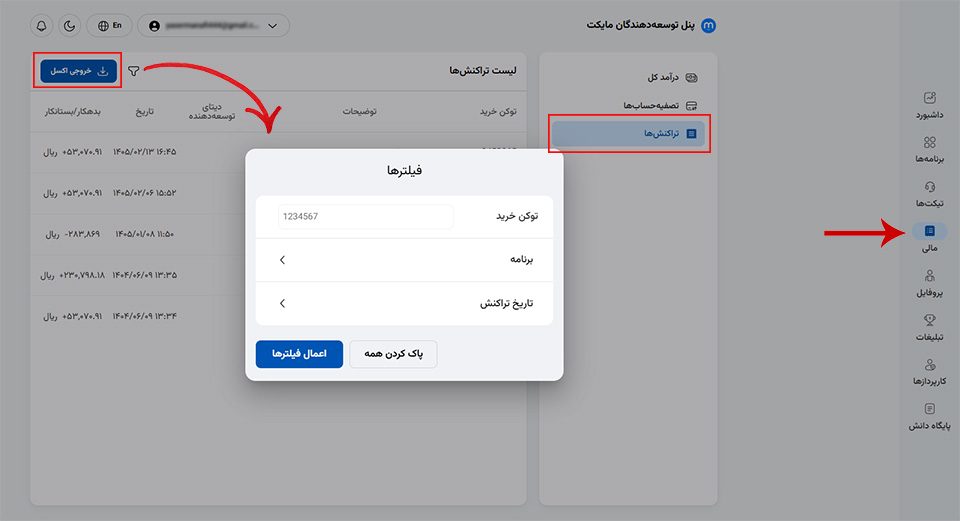
For precise app sales information, select Finance in the right-side menu, then Transactions. You can view detailed financial records and download an Excel file if needed. Filters on the left let you display information for a particular app or a specified period.
Select Total revenue to view revenue over different periods. This section shows only the current month's revenue. If revenue from previous months remains unsettled, download and view those months' transaction details through Excel exports.
Settlement with Legal-Entity Developers
Monthly settlement with legal entities requires an invoice registered in the Taxpayers System. This requirement is covered by the implementing regulation under Note 3 of amended Article 169 of the Direct Taxes Act, particularly Article 8, which requires tax registration, official invoices, and economic codes. Article 19 also specifies a 2% penalty for failing to issue invoices.
To simplify settlement for legal entities, from 1 Ordibehesht 1404 SH physical invoices no longer need to be sent to Myket. Developers only need to register the sales invoice for their previous settlement in the Taxpayers System before month-end.
To view a monthly invoice, open Finance, then Settlements. Select Invoice issuance guide and choose the year and month.
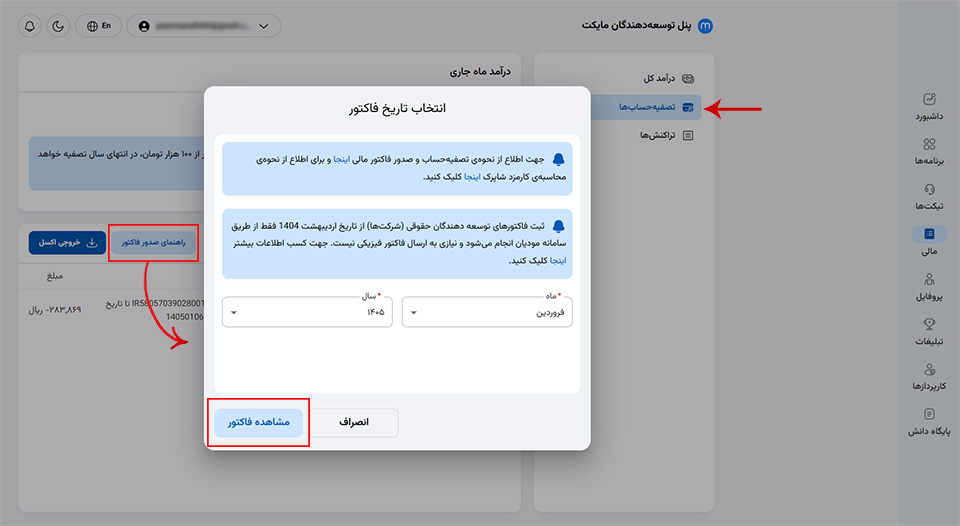
This section shows monthly Net Sales and VAT. Legal-entity developers can use these figures to register the previous month's sales invoice in the Taxpayers System.
Remember:
- Complete the legal entity's identity details in Profile.
- Register the invoice accurately and in the required format, with Hooshmand Gostar Hootan Pars as the buyer, including valid legal-entity name, national ID, economic code, address, postal code, and other information.
If sales invoices are not present in Myket's Taxpayers System inbox before each month's VAT payment date, VAT cannot be paid to legal-entity developers that month.
Settlement of your developer share and VAT depends on correctly registering the Net Sales invoice in the Taxpayers System.
Issuing and Receiving Myket Advertising Panel Invoices
For an official invoice for payments made from the 1st through the 15th, submit a new ticket no later than the 15th of that month. For payments from the 16th through month-end, submit it no later than month-end. The request must include individual or legal-entity information, the online payment tracking code, and terminal number.
Invoices cannot be issued for requests submitted outside these periods.
Official invoices can be issued for individuals or legal entities.
The minimum amount for an official invoice is one million tomans.