Advertising Content on Myket
Advertisements displayed in your app are part of the app and its content. The developer is therefore responsible for the consequences of any inappropriate content they contain or display. Your app's advertisements must not violate the Content rules, such as promoting criminal activity, violence, or sexual content, or the Privacy rules. The following explains Myket's advertising rules in detail.
User privacy and security matter to Myket. In-app advertisements related to Android apps available on Myket must therefore direct users exclusively to Myket. This lets users easily download and install directly from Myket. This approach follows Myket's rules and regulations; directing in-app advertisements to other Iranian stores violates Myket's rules.
Apps using user location information for advertising must follow sensitive information and privacy policies. Using or collecting device location data for advertising must be transparent to users, and the reason for access must be clearly explained in the app's rules and privacy section. You may not request precise device location solely for advertising.
The following guidelines can help:
Advertisements must suit each app's target age group. Adult advertisements are not permitted in children's apps. Advertisements shown in your app must be appropriate for its intended audience, even if the app's own content complies with Myket's rules.
Advertisements must remain within the app and must not appear in widgets, notifications, keyboards, or similar areas. Apps may not display advertising pop-ups outside the app.
Disruptive Advertising
Disruptive advertisements appear unexpectedly and may cause accidental clicks or interfere with device functionality. Advertisements displayed by your app must not annoy users. Disruptive advertising can take many forms; some examples follow. Developers must nevertheless respect all user rights in this area.
-
Display advertisements within your app: Show all advertisements within the app without annoying users or forcing them to select them. Advertisements must not start when users press Home or unrelated icons. Advertising on the lock screen is also prohibited.
-
Place advertisements appropriately within the app: Advertisements must not be displayed in a way that causes accidental clicks or makes parts of the app difficult to use.
-
Advertisements must not imitate or counterfeit app interfaces, notifications, or operating-system warning elements. Users must be able to identify which app provides the advertisement. Advertisements must also not start when users select options intended for something other than voluntarily watching advertisements, such as exiting the app.
-
Do not create advertising shortcuts, bookmarks, or icons: Your app and its advertisements must not create advertising shortcuts on the Android home screen.
-
Do not use notifications for advertising: Apps must not use notifications to send advertisements. Notifications may be used for app-related information such as updates, new features, events, and in-app discounts.
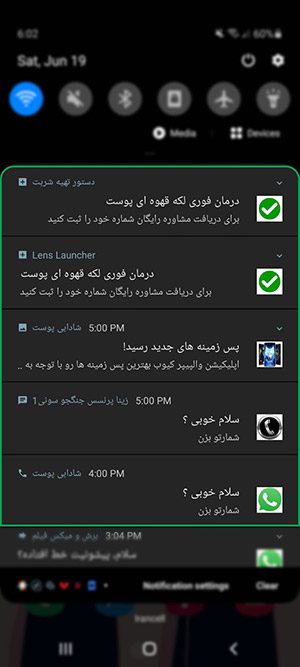
The image above shows an advertisement imitating a system notification.
- Using ongoing notifications is against the rules unless the app needs them to function correctly. If your app requires ongoing notifications to function correctly, implementing a way to dismiss or disable them is recommended.
The following are also examples of disruptive in-app advertising:
- Full-screen advertisements that appear unexpectedly while using an application or website and require users to close them to access the main content.
- Video advertisements that play automatically while using an application or website and usually have a specified time restriction. These may disrupt the user experience and are considered disruptive advertising.
- Unskippable video advertisements that play automatically while using an application or website and must be watched in full. Because they cannot be skipped and require viewing, they are considered disruptive advertising.
- Video advertisements that play automatically when users open an application, before they enter it.
Misleading Advertising
Advertisements shown by an app must not be misleading, and the app displaying them must be clearly identifiable.
The following guidelines can help:
- Do not use a fake interface: Advertisements must not look like an app's interface. Clearly show users that the displayed items are advertisements. For example, you can use an advertising label within your app.
- Do not simulate or imitate system messages: Displaying advertisements as Android or Myket system messages and warnings is against the rules.
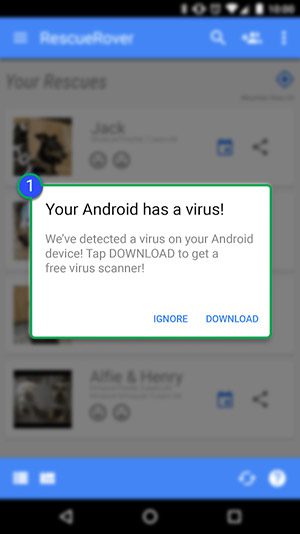
The image above shows an advertisement imitating a system notification.
- Do not imitate update messages: Counterfeiting Myket or Android update messages is against the rules.
Inappropriate Advertising
Offering incentives to install apps is against the rules. To prevent unauthorized manipulation of an app's position in Myket's lists, encouraging users to install other apps by offering incentives, such as coins, is prohibited.
If you directly or indirectly use methods harmful to users and developers to promote your app's position, Myket will prevent its publication. Developers are responsible for ensuring that advertising networks and other parties associated with their app follow these rules and do not use unauthorized promotion methods.
Examples of inappropriate in-app advertising include:
- Unauthorized and misleading advertising methods to increase app installs that do not knowingly direct users to the app's Myket page, or cause app downloads without the user's request and informed knowledge.
- Misleading or disruptive advertisements on websites, in apps, and elsewhere, such as ordering advertisements for your app in other apps' system notifications.
Fraudulent Advertising
Fraudulent advertising harms developers and users and erodes long-term trust in the mobile advertising ecosystem. It is therefore strictly prohibited. Fraudulent advertising may result from developers implementing advertisements through unauthorized methods, including hidden advertisements, automatic ad clicks, modifying information, and nonhuman manipulation such as bots.
Examples of fraudulent advertising:
- Apps that serve advertisements that users cannot see
- Apps that automatically click advertisements without user intent
- Apps that show advertisements when users are not using them
Advertising Optimization
- Advertising frequency
The number of advertisement repetitions is an important factor in advertising effectiveness. Excessive repetition may reduce users' trust in the brand and product. Advertisements in apps should therefore not repeat so often that users stop using the app. Research has shown that more than 3 to 5 repetitions on one page may be considered annoying by some users.
- Advertising duration
Generally, advertisements that need more than 5 seconds to display and load may be intrusive for some users. However, the level of disruption depends on their content, frequency, presentation, and users' personal preferences. Some users may be dissatisfied even with advertisements lasting only a few seconds. To improve the user experience, try to design and display advertisements according to users' needs and preferences.