Document Submission Guide
Developers often need to send documents or other materials to Myket reviewers. These may concern:
1. App licenses and agreements
2. Problems using Myket services
3. Problems using the Myket developer panel
4. Demonstrating the functionality of a particular app section
5. Reporting other apps' violations or infringement of intellectual property in works and content
6. Any other documents or materials Myket reviewers may request
If you need to send documents and files relating to your app, contact us through Tickets in your developer panel.
On the New Ticket page, attach the files to your ticket.
Common supported formats include:
JPEG, PNG, TXT, PDF, DOCX, XLSX, RAR, ZIP
If you need to send other formats, place the files in a ZIP or RAR archive and attach it to the ticket.
Documents and files are normally sent through Tickets. However, you may need to email your documents or report to Myket developer support. You can email developer@myket.ir in the following cases:
- You were explicitly asked to send specific documents or materials to Myket from a specified email address.
- Your documents, explanations, or request must be sent from your organization's email address.
- You cannot access your developer panel, for example because of an access problem or because you do not have the username or password.
- You cannot access Tickets because you use an agent account without permission for that section.
- You have not yet created a Myket developer account.
The following explains situations in which reports or documents may be needed or requested by Myket:
1 – App Licenses and Agreements
Depending on your content or service, you may need to provide an operating license or agreements with services supplying your content or services.
Examples include:
- A SATRA license for film and series streaming apps
- Agreements and licenses to use other publishers' audiovisual content
- A trade license for services operating in a particular trade
- Permission or an agreement to use others' content or works within an app or game
- Agreements with financial and banking service providers for apps providing such services
This also includes any other licenses or documents obtained for your service or app or requested by a reviewer.
You can send these documents through:
- A ticket in your developer panel, with the documents attached
- The “Additional notes for the app reviewer” section when finally submitting your app for review, with documents attached
- Email to developer@myket.ir
A reviewer will check your documents and notify you whether they are approved.
Preserve confidentiality when sending documents and agreements: cover or blur any information you consider confidential in submitted images or documents.
2 – Problems Using Myket Services
If you encounter problems or errors using any Myket service for developers, or need to report a problem with your app's activity on Myket, submit your report only through Tickets in your developer panel.
Include:
- A full description of the problem or error and the affected service or section
- Any error logs or messages
- A screenshot or screen recording, if possible
- Any details or explanations that can help Myket investigate thoroughly and accurately
After receipt, your request is referred to the relevant team and the ticket is marked Under review. Once the investigation is complete, the result is communicated through the same ticket.
These issues may take time to investigate because of their nature. Please be patient until the investigation is completed and the result is known.
3 – Problems Using the Myket Developer Panel
If you encounter a problem in any part of the Myket developer panel, submit a report for further investigation.
Include:
- A full description of the problem or error and the affected section
- Any error logs or messages
- A screenshot or screen recording captured when the issue occurs
- Any details or explanations that can help Myket investigate thoroughly and accurately
Submit through Tickets. If you cannot access that section, email Myket support at developer@myket.ir from your developer panel's registered email address. Include all requested information in your report.
After receipt, your request is referred to the relevant team and the ticket is marked Under review. The result is communicated through the same ticket after the investigation is completed.
These issues may take time to investigate because of their nature. Please be patient until the investigation is completed and the result is known.
Using browser DevTools:
When investigating developer panel problems, we may need to see the Network or Console tab in your browser's Inspect or Developer Tools while you use the panel.
Open these tools using your browser's method, such as F12 in Chrome, and go to the requested tab. See the image below:
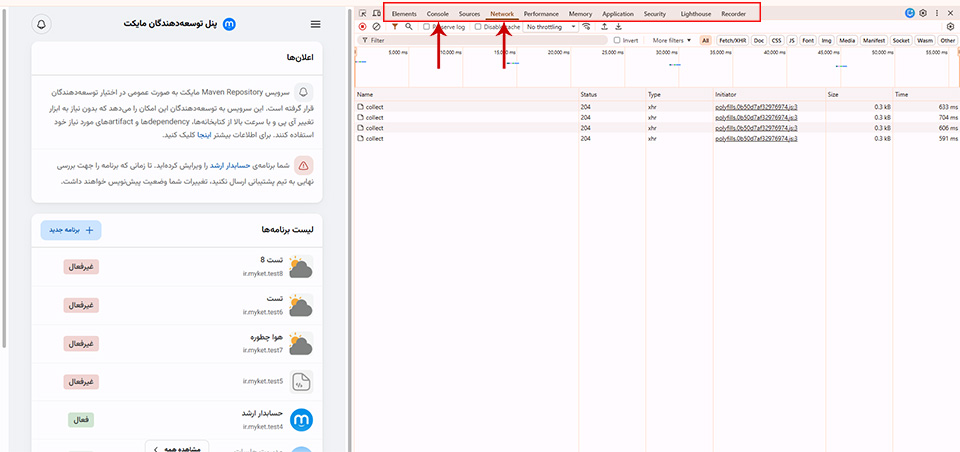
As shown above, you may be asked to open Network or Console.
After opening the tools and requested tab, begin recording your screen and repeat the process that produces the error or problem. Attach the recording to your report ticket.
4 – Demonstrating a Particular App Section
If you need to document your app's functionality during publication on Myket, send screenshots or a recording of the app through Tickets for Myket reviewers to examine.
5 – Reporting Other Apps' Violations or Intellectual Property Infringement
To report another app's violation or unauthorized use of your work or content in another app or game, submit a report through Tickets.
Attach complete evidence of the violation. It must conclusively establish the unauthorized use of your work or content or the reported violation.
Myket reviewers will examine your documents and explanations and inform you of the result.
6 – Other Documents or Materials Requested by Myket
During publication and throughout your app's activity on Myket, documents, evidence, or other materials may be requested at any time.
Myket reviewers send these requests through Tickets. Carefully review the request and its deadline, then prepare and provide the requested explanations or documents within the specified time.