Blocked By Play Protect Error
To provide a safe environment and prevent the installation and intrusion of malicious apps and malware, Google sets specific rules and standards for developers' applications. Failure to follow them when building and exporting an app causes Play Protect errors. Google's security shield may therefore report an error for various reasons.
Resolving the Blocked By Play Protect Error
The error can have various causes, and resolving it may require different actions depending on the cause and the developer's investigation.
The most common solution is Google's Play Protect Appeals form. Open it here, or search Google for “Play Protect Appeals.”
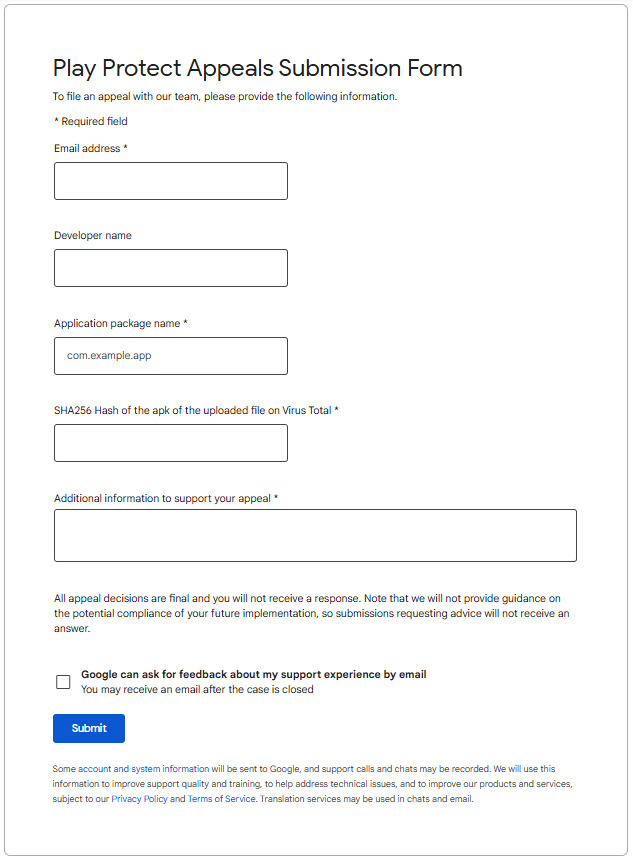
This form is inaccessible from Iranian IP addresses and can only be accessed using IP-changing software.
- Email address: Your email address
- Developer name: The developer's name
- Application package name: The app's package name
- URL to download your APK file: A direct app download link.
Upload the apk somewhere Google's reviewers can download it. Preferably use your app's domain; if you do not have a website, use services such as File. - Additional information to support your appeal: An English explanation of the app
After completing and submitting the form, you should receive a message similar to:
“We have successfully received the appeal for your app, Our team will review the app an any information you have provided”
Review may take up to one week. Do not change the app's signing identity or Package Name during this time; wait. Google does not notify you after review. After a few days, test installation on an internet-connected device with Google Play Protect enabled.
Unknown Developer Error
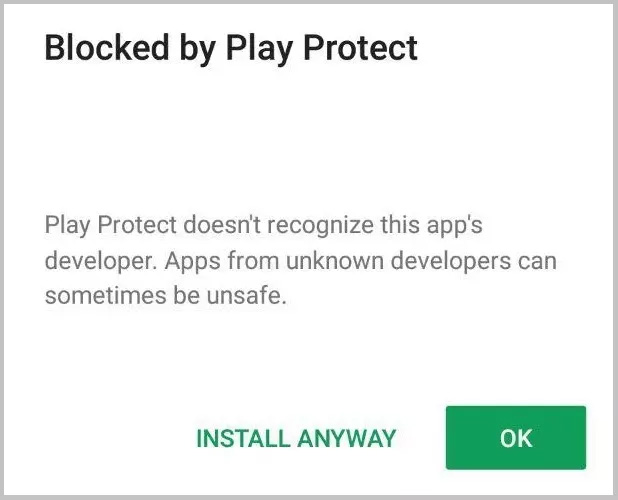
“Play Protect doesn't recognize this app's developer. Apps from unknown developers can sometimes be unsafe.”
One common issue is Unknown Developer, an error that appears during installation. Google does not recognize your developer account and informs users that an app from an unknown developer is being installed.
Play Protect recognizes developers through app signatures. Carefully complete every field in Android Studio when creating your signing identity:
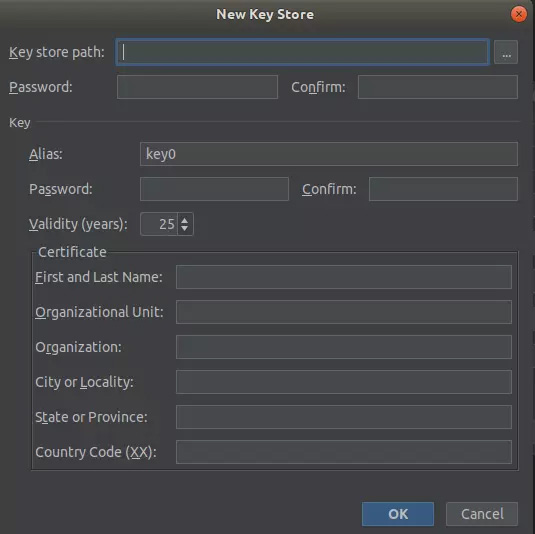
“The signing identity creation page in Android Studio”
- Alias: Alias
- Password: Key password
- Confirm: Password confirmation
- Validity: Expiration date
- First and Last Name: First and last name
- Organizational Unit: Organizational role
- Organization: Organization or company name
- City or Locality: Place of residence
- State or Province: Province
- Country Code: Enter IR.
If you publish your app on Google Play using this same signature, the signature becomes recognized and this issue does not occur. This is the most reliable and definitive approach, but is not possible for every developer.
Other Possible Causes of Google Play Protect Errors Include:
- Sensitive permissions involving users' personal information and privacy
- A Target SDK value and related code that do not meet current Android standards
- Backdoor code
- Ransomware
- Trojans
- Commercial espionage tools
- Phishing tools
- Spyware
- Code for device rooting and sending spam
- Other Android or non-Android security threats in project code that endanger device security, personal information, or privacy, or execute unwanted functions, processes, or operations on the Android device without the user's knowledge and permission
Why Play Protect Issues Must Be Resolved
Google's security shield is part of the core Android platform, active on all Android devices. If an app is identified as unsafe, users receive an unsafe-app warning. Myket never permits unsafe apps, and publishing an app that will later be identified as unsafe on users' phones explicitly violates its publishing rules.
Myket relies on several security tools to prevent unsafe apps from being published. One of the most important is Google Play Protect, Android's official security tool, which examines installed apps from many security perspectives. It therefore cannot be removed from Myket's review and publishing process.
Google Play Protect is one of Android's most reputable tools, and its results are fully reliable. If it identifies your app version as unsafe, this means a definite security issue exists in that version, potentially for various reasons, and requires your investigation and follow-up.