Setting the Publication Time
All apps require review and approval by Myket before publication. Publication timing can be determined in either of these ways:
1. Manual publication by the developer at their chosen time
2. Publication by Myket immediately after review and approval
If you want publication at a particular date and time, enable “Manual publication.” After Myket reviews and approves your app, its status in the developer panel changes to “Ready to publish.” You can then select “Publish app manually” at any chosen date and time to make it available to users on Myket.
Enabling Manual Publication
Once your app is ready, select “Submit for final approval” and read the “Publishing rules.” The “App publication request” page displays the publishing conditions. You can also enter any notes for the app reviewer in the designated field.
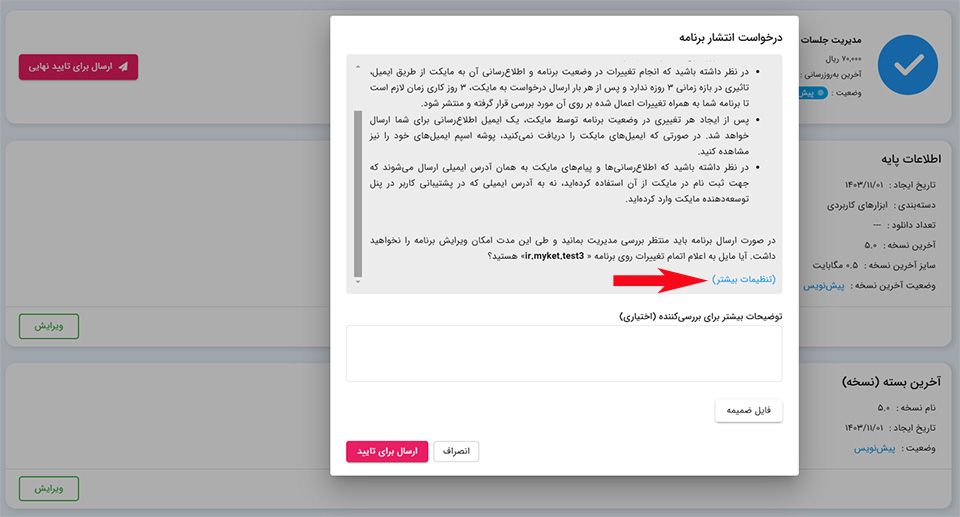
At the bottom of this page, select “More settings” to reveal “Manual publication.” Finally, select Submit for approval to send your app to the review team and place it in the review queue.
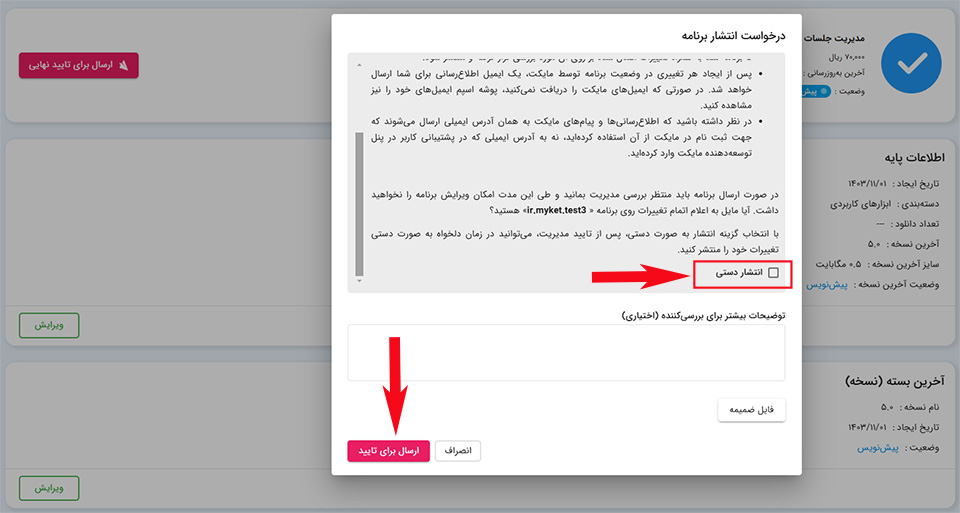
If “Manual publication” is not selected, Myket publishes the app and makes it available to users immediately after review and approval.