Keyword Suggestion Tool (Explorer)
Explorer is an intelligent assistant for reviewing and selecting keywords. In this section, developers simply search for their desired phrases or words, and the system provides information about their daily search counts, the average install price for each word, and the level of competition among advertisers for each word.
Explorer's Functions and Capabilities
- Provides a list of suggested words appropriate to the words entered
- Displays search volume and competition for each word
- Displays the average install price for each word
- Lets you add Explorer keywords directly to a campaign of your choice
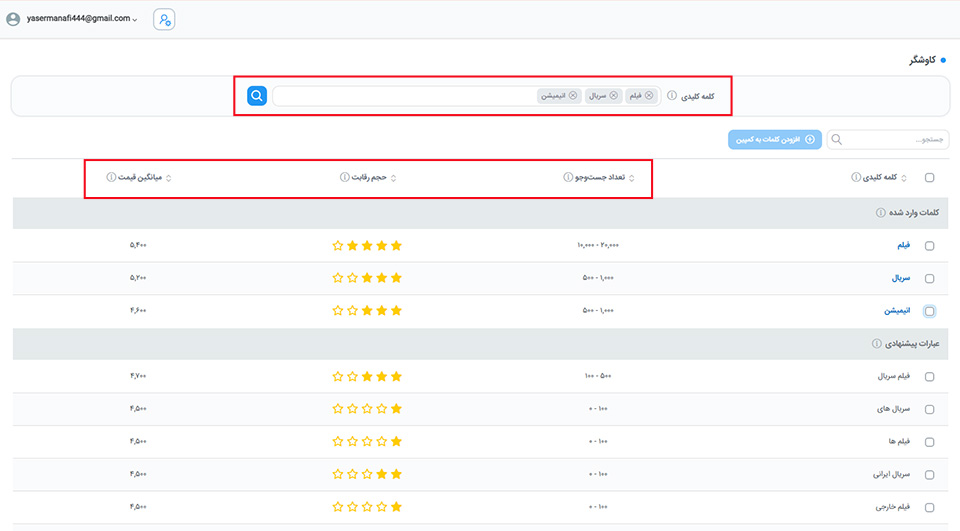
In this image, the words “film,” “series,” and “animation” have been added. Information about these words and suggested phrases is provided below.
Table Information:
- Search Count: The approximate number of daily searches for each phrase on Myket
- Competition Volume: A relative value derived from the number of active campaigns for each word and the quality of the apps participating in its auctions
- Average Price: The average cost of each successful install over the past 10 days. This value is calculated based on the amount deducted per install. Therefore, given the price calculation model in Search Ads, the winning app's bid is always higher than this amount.
Suggested Phrases
Based on the words and phrases entered by the developer, Explorer suggests suitable phrases and words. Developers can review these phrases and words and use them in their campaigns.
Adding Words to a Campaign
Developers can select their desired words and phrases and add them to their campaign by clicking “Add Words to Campaign.”
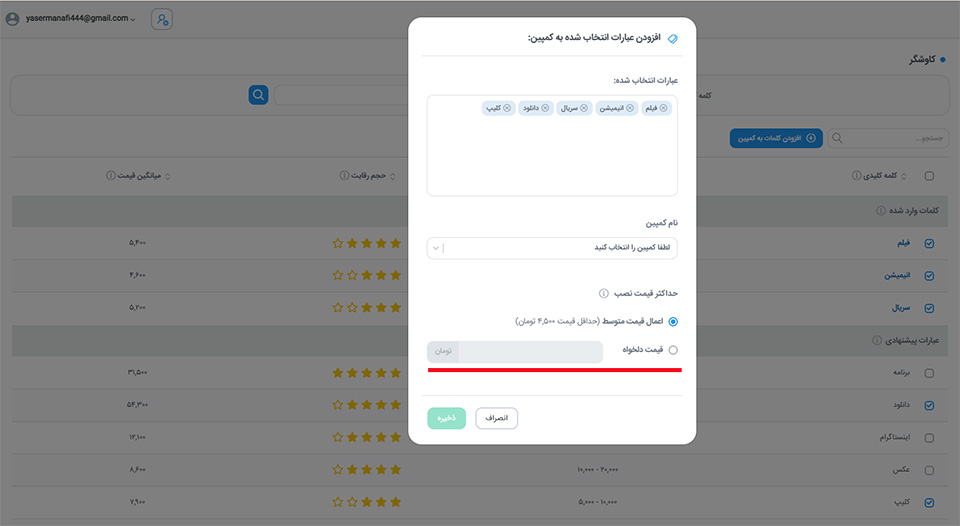
As shown in the image above, after selecting the desired campaign, you must set the maximum install price for the selected words. There are two ways to set the price:
- Apply Average Price: This price is equal to the average price listed in the Explorer table.
- Custom Price: Selecting this option lets developers set their desired price for these words.
After setting the price, click Confirm to add the selected words to the campaign.
When several words and phrases are selected, the developer's custom price is the same for all of them. If the developer wants to set a custom price for each word or phrase that differs from the others, the words must be added one at a time.